What is a Web Application?
The fundamentals: browsers, servers, HTTP, and rendering — with Next.js and the KAP web app (web/) as the running example.
Introduction
A web application is software whose user interface is delivered through a web browser and whose logic and data live (at least partly) on a server. Unlike a desktop application, nothing is installed on the user’s machine: the browser downloads the application on demand, runs it, and talks back to the server over the network.
It helps to contrast three things that are often conflated:
| Static website | Web application | Desktop application | |
|---|---|---|---|
| Delivered via | Browser | Browser | OS installer |
| Content | Same for everyone | Per-user, per-state | Per-user, per-state |
| Logic runs | Nowhere (just documents) | Browser and server | User’s machine |
| Data lives | In the pages themselves | Databases behind the server | Local disk (usually) |
| Updates | Republish files | Deploy once, everyone is current | Every user must upgrade |
KAP’s web frontend is firmly in the middle column: when an integrity engineer opens https://…/w/integrity/campaigns, what they see depends on who they are, which organization they belong to, and what data their campaigns hold — none of which is baked into a static page.
The client–server model
Every web application, however sophisticated, is built on one loop:
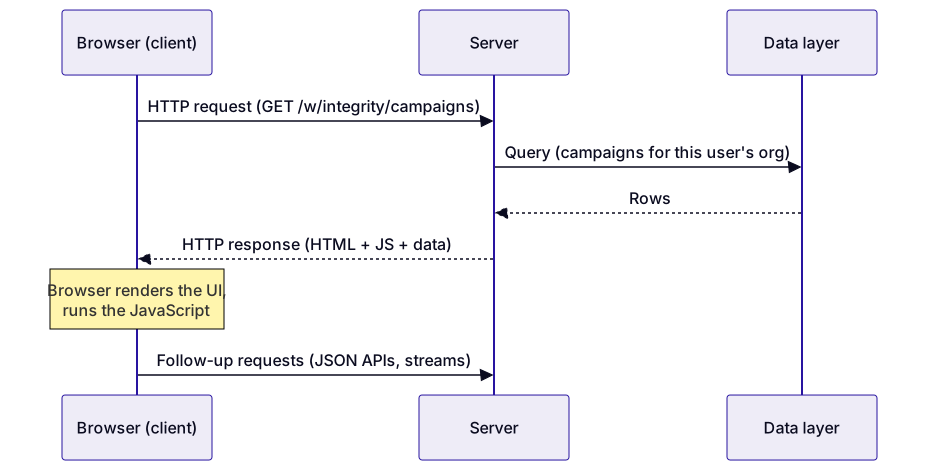
The two halves have distinct jobs:
- The client is the browser. It understands exactly three languages — HTML (structure), CSS (appearance), and JavaScript (behavior) — and no matter which framework a team uses, what ships to the browser is always compiled down to those three.
- The server is any program that answers HTTP requests. It authenticates the user, enforces permissions, runs business logic, talks to databases and other backends, and returns responses — HTML pages, JSON data, or streams.
HTTP is the contract between them: the client sends a request (a method like GET or POST, a URL, headers, and optionally a body), the server sends back a response (a status code like 200 or 404, headers, and a body). The server keeps no memory of the connection between requests — HTTP is stateless — so state that must survive across requests is carried in cookies (e.g. a session token) or stored server-side against the user’s identity.
Frontend and backend
In practice, teams split a web application into:
- Frontend — everything that runs in the browser: rendering the UI, handling clicks and keystrokes, managing on-screen state.
- Backend — everything that runs on servers: APIs, authentication, database access, integration with other services.
Modern frameworks exist because writing raw HTML/CSS/JS for a large, interactive app does not scale. The KAP frontend uses React, which lets you describe the UI as a tree of reusable components that re-render automatically when their data changes — and Next.js, a framework on top of React that supplies everything React deliberately leaves out: routing, server-side code, build tooling, and deployment structure.
Next.js is a useful example precisely because it blurs the frontend/backend line: a single Next.js project contains browser code and server code, which is exactly how KAP’s web/ directory is organized.
Anatomy of a Next.js application (the KAP web app)
Next.js uses file-system routing: the folder structure under app/ is the URL structure of the application. Each concept below maps to a real file in web/:
| Concept | What it is | In the KAP web app |
|---|---|---|
| Page | UI for one route | app/(authenticated)/w/… — the workspace pages |
| Layout | Shared chrome wrapping child pages | app/layout.tsx (root), per-section layouts below it |
| Route group | Folder in (parens) that organizes routes without changing URLs |
app/(authenticated)/, app/(public)/ |
| API route handler | Server-only endpoint returning JSON/streams | app/api/… — e.g. app/api/ag-ui-chat/route.ts |
| Middleware | Code that runs on every request before routing | middleware.ts — Supabase session check, workspace redirects |
| Components | Reusable UI building blocks | components/, modules/ |
| Styling | Utility-class CSS | Tailwind CSS (tailwind.config.js, styles/) |
So a URL like /w/integrity/campaigns is answered by a page component nested under app/(authenticated)/w/, wrapped in the authenticated layout, having first passed through middleware.ts — which verifies the user’s Supabase session cookie and redirects to login if it is missing.
Server code and client code in one project
The most important Next.js idea to internalize: some of your code runs on the server, some in the browser, and you choose which.
- Server Components (the default in the App Router) render on the server. They can read databases and secrets directly; only the resulting HTML is sent to the browser. No component code ships to the client.
- Client Components (files starting with
'use client') ship to the browser and run there. Anything interactive — click handlers, form state, live updates — must be a client component. KAP’s chat UI and galleries are client components because they react to user input and streamed events. - Route handlers (
app/api/…/route.ts) are pure backend: they never ship to the browser at all. KAP usesapp/api/ag-ui-chat/route.tsas a proxy that forwards chat requests to the AI backend — so the browser never needs to know where the AI server lives or hold its credentials (see Web ↔︎ AI Integration).
This split matters for security (secrets stay in server code), for performance (less JavaScript shipped to the browser), and for reasoning about bugs (an error in a route handler shows up in server logs, not the browser console).
Rendering strategies
“Who builds the HTML, and when?” is the axis on which web architectures vary:
| Strategy | HTML is built… | Good for | In KAP |
|---|---|---|---|
| Static (SSG) | Once, at build/deploy time | Content that rarely changes | The handbooks site you are reading (Docusaurus) |
| Server-side rendering (SSR) | On the server, per request | Personalized pages that must load fast | Workspace pages’ first paint |
| Client-side rendering (CSR) | In the browser, by JavaScript | Highly interactive views | Chat, galleries, viewers after first paint |
A classic single-page application (SPA) is pure CSR: the server sends one nearly-empty HTML shell and JavaScript builds everything. Next.js instead renders the first view on the server (fast first paint, real HTML) and then hydrates it — attaches the React event handlers in the browser — after which navigation and interaction behave like an SPA. You get the initial-load behavior of SSR with the interactivity of CSR.
Beyond request/response, web apps can hold a connection open for real-time updates. KAP uses Server-Sent Events (SSE) — a long-lived HTTP response the server keeps writing to — to stream agent output token-by-token into the chat UI. That protocol is the subject of the Web/AI Interface and AG-UI contract chapters.
The full picture
Putting it together for one KAP interaction — a user asking the AI about their datasets:

Everything else in this handbook zooms into parts of this picture: the workspace shell and routes, the module registry that pages plug into, the proxy route to the AI backend, and the protocol and event contract that flow over the SSE stream.
Key takeaways
- A web application is client + server + HTTP: the browser renders and reacts, the server authenticates, decides, and fetches.
- The browser only ever runs HTML, CSS, and JavaScript — frameworks are developer-side tools that compile down to those three.
- HTTP is stateless; identity and session state ride along in cookies and are re-checked on every request (KAP:
middleware.ts+ Supabase). - Next.js puts frontend and backend in one project; the
app/folder is the URL map, and each file is explicitly server code or client code. - Rendering strategy is a spectrum — static, server-rendered, client-rendered — and a real app like KAP uses all three where each fits.
Last Updated: 2026-07-29