Web Handbook
The engineering handbook for the KAP web application (web/).
Architecture
The KAP web application is the product’s user-facing surface: the place where data explorers prepare campaign evidence and integrity engineers triage it and drive governed action. One Next.js project contains three layers — the React client in the browser, the Next.js server (middleware, server components, and ~97 API route handlers), and the external services those handlers front:
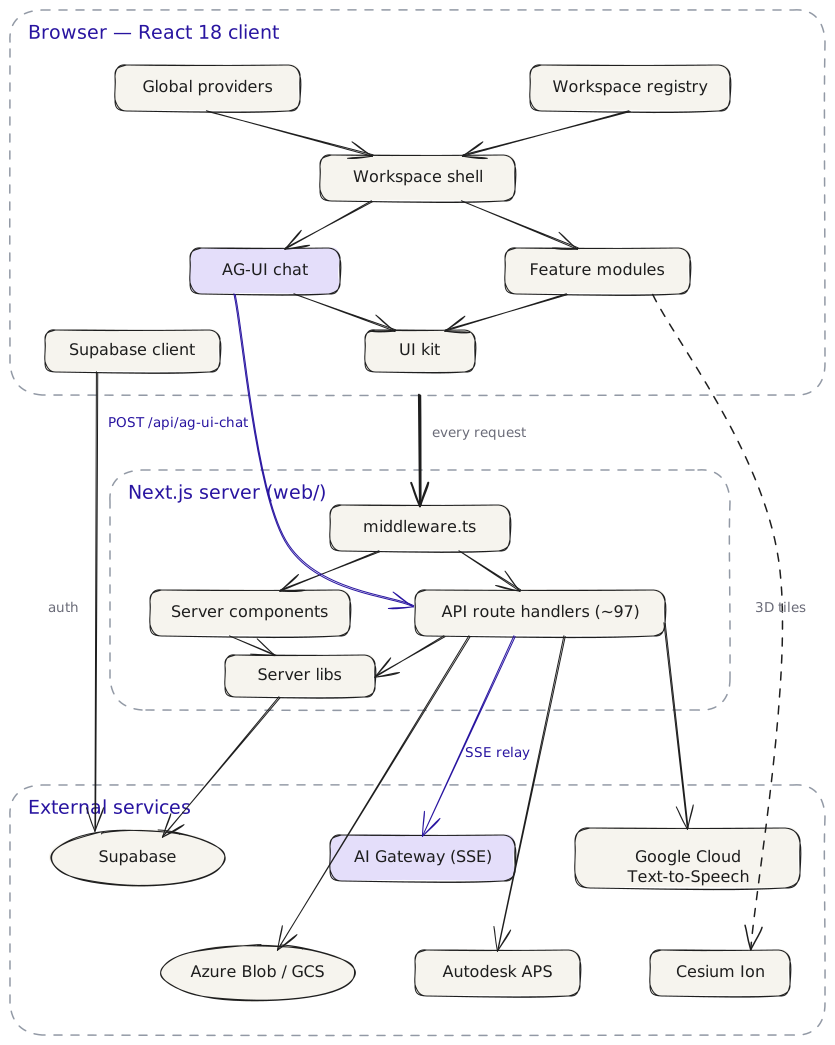
The diagram is an Excalidraw drawing with the scene embedded in the SVG — to edit it, open content/assets/web-architecture.excalidraw.svg in Excalidraw and re-export with “embed scene” enabled.
Reading the diagram top to bottom:
- Client. The root layout (
app/layout.tsx,providers/) wraps every page in the theme, session, and organization providers. Authenticated pages render inside the workspace shell (components/workspaces/) — context bar, sidebar, and assistant panel — which the workspace registry (lib/workspaces/) populates: which modules exist, their routes, permissions, and the campaign scope. Heavy interactive surfaces live in self-contained feature modules undermodules/— gallery, photo-map-3d, gas-heatmap, thermal-pair-viewer, cad-viewer, dataset-onboarding (three of them embed a Cesium globe). The AG-UI chat stack (components/chat/, theuseAGUIClient/useAguiEventshooks,lib/ag-ui/) drives the assistant experience. Both build on the UI kit (components/ui/, shadcn/ui + Tailwind); the Supabase browser client (lib/supabase/client.ts) holds the auth session. State is managed with React contexts and hooks — there is no global Redux store. - Server. Every request passes through
middleware.ts(Supabase session refresh, workspace redirects) before reaching a server component (app/) or one of the API route handlers (app/api/, Swagger at/api-docs) — the app’s backend-for-frontend, documented in Backend API & Swagger. Both lean on the server libs inlib/: the Supabase server/admin clients, cloud-storage, and JWT helpers. - External. The route handlers front Supabase (auth, Postgres with RLS, storage), the AI Gateway (the SSE chat stream at
/chat/agui/stream), dataset media in Azure Blob/GCS, Autodesk APS for CAD translation and viewing, and Google Cloud Text-to-Speech; the 3D modules stream tiles from Cesium Ion directly.
| Framework | Next.js 15 (App Router) + React 18 |
| Language | TypeScript |
| Styling | Tailwind CSS + shadcn/ui |
| State | React contexts and hooks (no Redux) |
| Auth & database | Supabase (session cookies checked in middleware.ts) |
| AI connection | SSE stream proxied through app/api/ag-ui-chat |
| 3D & viewers | CesiumJS (gallery, photo-map-3d, gas-heatmap), Autodesk APS (CAD) — see 3D & CAD Visualization |
| Tests | Vitest (API + components), Playwright (end-to-end) — see Testing |
| Source | web/ at the repository root |
How this handbook is organized
The chapters follow a reader’s path — fundamentals first, then the app’s structure, then its connection to the AI backend:
- What is a Web Application? — the fundamentals: client and server, HTTP, frontend vs. backend, and rendering strategies, using Next.js and the KAP app itself as the running example. Start here if you are new to web development.
- Folder Structure — the map of
web/: the whole directory tree annotated, then a tour of each area — routes underapp/, building blocks, shared logic, tests, and configuration. Its companion page, the Page Route Inventory, lists all 39 page routes in plain English. - Workspaces — the app’s top-level structure: the two role workspaces (Data Explorer, Integrity Engineer), the shared shell, the scope model, and the end-to-end workflows each role runs.
- Workspace Modules — the plug-in contract: how a module (Campaigns, Investigate, Assets, …) registers into a workspace’s shell, sidebar, route, and scope.
- Component Library — the reusable building blocks screens are assembled from: the
components/folder structure, the shadcn/ui kit, the workspace widget library, and where a new component belongs. - 3D & CAD Visualization — the browser-side 3D stack: the CesiumJS globe, Google Photorealistic 3D Tiles, 3D Gaussian Splat reconstructions, and the Autodesk APS CAD viewer — what each is and which module renders it.
- Backend API & Swagger — the web app’s own backend: opens in plain language for non-technical readers (what an API is, what Swagger guarantees), then the engineering guide — how to read
swagger.yamland use the interactive docs at/api-docs. Its companion page, the API Endpoint Inventory, lists all 118 backend operations in plain English. - Roles & Access Control — who can access what: the viewer/member/admin role model, the four enforcement layers (middleware, layout guard, server checks, RLS), and the rules per resource — organizations, datasets, modules, and work orders.
- Web ↔︎ AI Integration — the request path from the browser to the AI backend: the proxy route, configuration, the AG-UI client, and engine selection.
- Web/AI Interface — the narrative guide to the AG-UI protocol: the SSE event lifecycle, tool-call visibility, custom KAP events, and state synchronization.
- AG-UI Interface Contract — CONTRACT-CDC-001, the normative event contract between the AI backends and the frontend (generated from the canonical source, lint-enforced).
- Testing the Web Application — the component, API route, and end-to-end suites: how each works, how to run them, and how to work test-first where it pays off.
Neighboring handbooks: the server side of the AI connection is documented in the AI Handbook, the data layer in the Database & Cloud Storage Handbook, and the platform-wide testing and traceability story in the Tests Handbook.
Last Updated: 2026-07-29